What Is a Video Management System (VMS)? The Complete Guide for Security Operators
A VMS is the software that connects your cameras, organizes footage, and makes monitoring practical at scale. Here is what it does, what it does not do, and how it fits into a modern security operation.
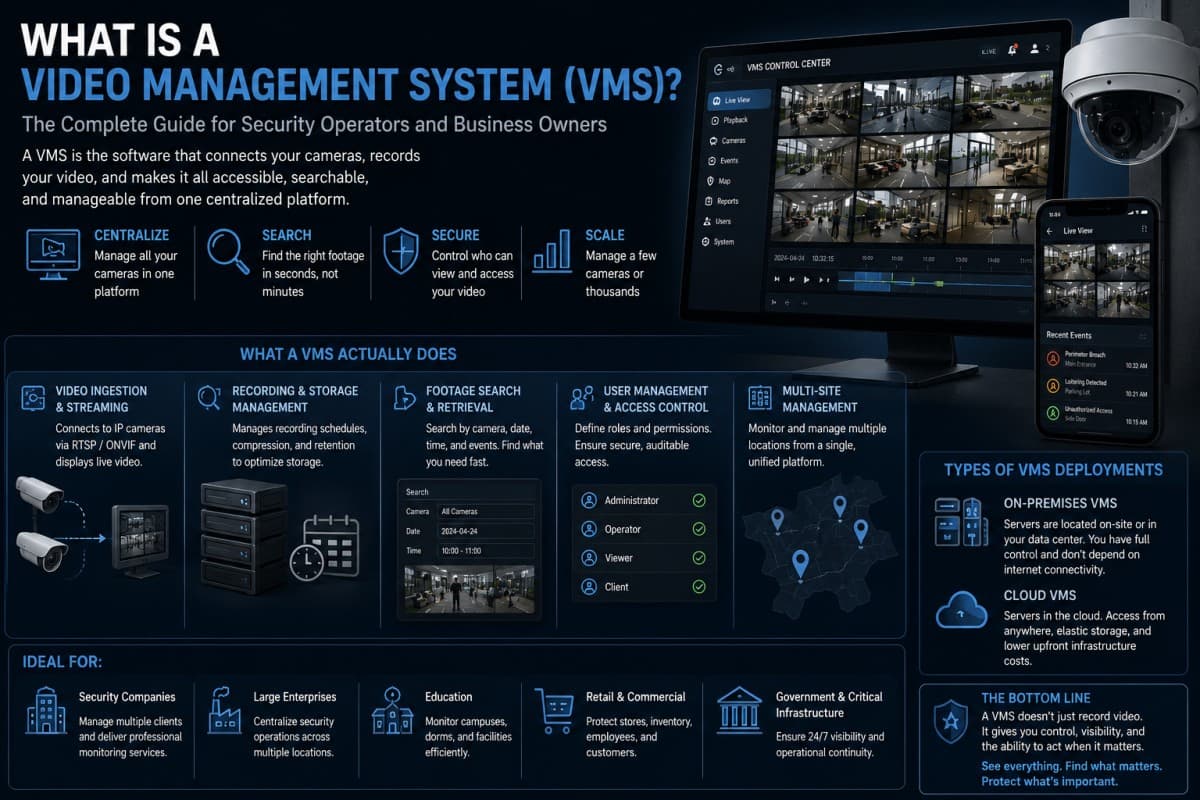
If you manage cameras for a business, a building, or a VMS security operation, you have probably heard the term VMS. Here is what it actually means, how it works, and what it can and cannot do for you.
VMS: The Software That Runs Your Camera Network
A video management system, usually referred to as a VMS, is the video management system software that sits between your cameras and the people who need to see what those cameras are recording. It handles the flow of video from dozens, hundreds, or even thousands of cameras, organizing it, storing it, and making it accessible in a way that would be impossible to manage manually.
Think of it this way. Without a VMS, each camera is an island. It records to its own local storage, you can only view it from its specific interface, and finding footage from a specific date and time across multiple cameras is a painful manual process. A video management system connects all of those cameras into a unified platform where a single operator can view any feed, search any recording, and manage the entire network from one place.
For any serious VMS security operation with more than a handful of cameras, a VMS is not optional. It is the foundational layer that makes the camera network operable.
What a VMS Actually Does Day to Day
Video Ingestion and Streaming
The most basic function of a VMS system is receiving video from cameras and making it available for live viewing. Cameras transmit video streams using standard protocols, most commonly RTSP (Real-Time Streaming Protocol) and ONVIF, which is an interoperability standard that allows cameras from different manufacturers to communicate with the same software platform.
When a camera connects to a VMS, the system receives its video stream, decodes it, and presents it in the operator interface. For a monitoring center with 200 cameras across 15 client sites, the VMS is what allows one operator to switch between any of those feeds from a single screen rather than managing 200 separate camera interfaces.
Recording and Storage Management
Recording is where VMS security infrastructure earns most of its keep operationally. A video management system manages recording schedules across the entire camera fleet: which cameras record continuously, which record only on motion detection, which cameras apply reduced frame rates during off-hours to save storage, and how long footage is retained before being overwritten.
Without this management layer, storage would be chaotic and expensive. With it, a VMS can compress footage intelligently using codecs like H.264 or H.265, schedule recordings to match actual risk windows, and give administrators visibility into storage utilization across the entire system so they can plan capacity before it becomes a problem.
Footage Search and Retrieval
When an incident occurs and someone needs to find footage of what happened, the VMS search and retrieval function is what makes that investigation practical. A well-designed VMS platform allows operators to filter footage by camera, date, time window, and in some cases by motion events or basic detection triggers, narrowing down hours of recording to the relevant clips in seconds rather than minutes.
For security companies documenting incidents for clients, for property managers responding to insurance claims, or for law enforcement requesting video evidence, efficient footage retrieval is one of the most operationally critical functions a VMS provides.
User Management and Access Control
A video management system also manages who can see what. Large organizations have different stakeholders who need different levels of camera access: a site manager might need to view cameras at their specific location but not others, a security analyst might need access to all cameras but no administrative functions, a client might need read-only access to a subset of cameras for their own review. VMS platforms handle these permission structures, ensuring that camera access is appropriately controlled and auditable.
Multi-Site Management
For organizations with cameras across multiple locations, multi-site management is the function that makes a VMS platform worth the investment. Rather than logging into a separate system for each location, a multi-site VMS consolidates everything into a single interface with a single set of credentials. An operator can switch from cameras at a warehouse in Houston to cameras at an office building in Bogotá without changing platforms or workflows.
Types of VMS Deployments
On-Premises VMS
In a traditional on-premises deployment, the VMS software runs on servers located at the facility or at the monitoring center. Video streams from cameras flow to those local servers, which handle recording, storage, and the operator interface.
On-premises deployments give organizations direct control over their data and do not depend on internet connectivity for core functions. For critical infrastructure operators, government facilities, and organizations with strict data sovereignty requirements, on-premises VMS is often the preferred or required approach.
The trade-off is infrastructure cost and maintenance responsibility. On-premises servers need to be sized for the camera fleet, maintained by IT staff, and eventually replaced as hardware ages. For organizations without dedicated IT resources, this overhead can be significant.
Cloud-Based VMS
Cloud-based video management systems move the server infrastructure to the cloud rather than hosting it on-premises. Cameras stream video to cloud servers, which handle recording, storage, and access. Operators view footage through a web browser or application that connects to the cloud platform.
Cloud VMS removes the hardware infrastructure burden from the organization. There are no servers to maintain, no storage hardware to replace, and no IT staff needed to manage the infrastructure layer. Updates are handled by the platform provider. Scaling up to add more cameras is a software configuration rather than a hardware procurement project.
The trade-off is bandwidth dependency. Every camera in a cloud VMS deployment needs reliable, consistent internet connectivity to stream its footage to the cloud. For sites with limited or variable connectivity, this can create gaps in recording or degrade video quality. For sites with good connectivity and no data sovereignty constraints, cloud VMS offers a clean operational model.
Hybrid VMS
Hybrid VMS platforms combine local and cloud elements. Cameras typically stream to a local network video recorder or edge device, which handles local recording and provides continuity even if internet connectivity is interrupted. The cloud layer provides remote access, centralized management across multiple sites, and backup storage for critical footage.
For most commercial security operations, hybrid is the practical architecture because it handles both the connectivity continuity of on-premises and the accessibility and scalability of cloud. Many enterprise VMS platforms default to a hybrid model for exactly this reason.
Major VMS Platforms in the US and Latin America
The VMS market is mature and competitive. The major platforms that appear most frequently in enterprise and security operator deployments across both markets include:
Genetec Security Center is one of the most widely deployed enterprise VMS platforms globally. It offers deep integration between video management and access control, a sophisticated multi-site interface, and a large ecosystem of compatible camera hardware. It is common in large corporate campuses, government facilities, and multi-site enterprise environments.
Milestone XProtect is another enterprise-grade VMS with a strong presence in the US and LATAM markets. It is known for its open platform architecture and large library of integrations with third-party analytics and hardware. It is frequently used by security integrators because of its flexibility and extensive partner ecosystem.
Avigilon Control Center (part of Motorola Solutions) is particularly common in North American deployments, with native integration with Avigilon's own camera hardware and increasingly sophisticated embedded analytics.
Hikvision iVMS and Dahua DSS are widely deployed in Latin America due to the dominant market share of both camera manufacturers in the region. These platforms are tightly integrated with their respective hardware ecosystems and are common in mid-sized commercial and residential security deployments.
Hanwha Wisenet WAVE is gaining ground in both markets, particularly in environments where NDAA-compliant hardware is required.
Each platform has strengths suited to specific environments and operator profiles. When evaluating video management system software, the right choice depends on your existing hardware, scale, and whether you need cloud, on-premises, or hybrid deployment.
What a VMS Does Not Do
This is the part that matters most for understanding where video management systems fit in a modern security operation, and where they fall short.
A VMS manages video. It does not understand it.
A VMS stores and organizes footage beautifully. But it does not watch that footage autonomously, learn what normal behavior looks like at each camera location, detect anomalies in real time, or alert operators to threats before they escalate into incidents. A VMS shows you what your cameras see. It does not tell you what your cameras should be paying attention to right now.
This is the gap that has driven the growth of AI security intelligence platforms as a distinct category alongside VMS. Most security operations with more than a few dozen cameras simply cannot be monitored effectively by human operators watching raw feeds. The volume of footage generated every hour far exceeds what any realistic monitoring team can meaningfully process.
The practical consequence is that most VMS deployments are primarily reactive: they are most useful after something has happened and you need to find the footage. The preventive value, detecting threats while there is still time to respond, is limited by how much of the live feed any human operator can genuinely watch with sustained attention.
AI security platforms that connect to existing VMS infrastructure, or directly to camera feeds, add the intelligence layer that closes this gap: continuous monitoring of every feed, behavioral anomaly detection against learned baselines, real-time validated alerts that reach operators only when something genuinely requires their attention.
How Closely Works With Any VMS
Closely is designed to be the AI intelligence layer that sits above your VMS, whether you are running Genetec, Milestone, Avigilon, Hikvision iVMS, or any other platform.
Closely connects to camera feeds via standard RTSP and ONVIF protocols, the same connection method your VMS uses. It processes the video streams in parallel, applying its three-tier detection pipeline: motion filtering at the first layer, computer vision object classification at the second, and AI behavioral reasoning at the third. Only events that pass all three layers generate an alert, which is what keeps false positive volume low and operator engagement with the alert stream high.
Your existing VMS keeps doing what it does well: recording, organizing, and providing access to footage. Closely adds what the VMS was not designed to provide: real-time AI detection that tells your operators what is happening while there is still time to respond, automated visitor management through the Portero AI voice agent, guard round supervision through the Supervisor agent, automated incident documentation through the Reporter agent, and intelligent footage search through the Investigador module.
For security operators in the US and Latin America managing camera networks with any video management system software at the base, Closely is the layer that converts that infrastructure from a recording system into an active security intelligence operation.
If you are evaluating how AI detection fits with your current VMS setup, the Closely team can walk through your specific configuration and explain exactly how the integration works.
10 Frequently Asked Questions About Video Management Systems
1. What is a video management system and what does it do? A video management system (VMS) is software that connects to a network of security cameras, organizes the video feeds from all of them, manages recording and storage, and provides a unified interface for live viewing and footage retrieval. Without a VMS, each camera would need to be accessed individually and footage would be difficult to search across a large installation. A VMS makes it practical to operate camera networks of any size from a single platform.
2. What is the difference between a VMS and an NVR? An NVR (Network Video Recorder) is a hardware device that connects to IP cameras and records their footage to local storage. A VMS platform is software that can connect to many NVRs and cameras simultaneously, providing a unified management interface across all of them. An NVR is typically used for smaller installations where local recording at a single site is sufficient. A VMS is used when you need to manage cameras across multiple sites, integrate with access control, or provide sophisticated multi-user access to footage.
3. What is ONVIF and why does it matter for a VMS? ONVIF is an interoperability standard that allows cameras from different manufacturers to communicate with the same video management system using a common protocol. Without ONVIF, a VMS would need to build custom integrations for every camera brand it supports. With ONVIF compliance, a Hikvision camera and a Dahua camera and an Axis camera can all connect to the same VMS without any manufacturer-specific configuration. Almost every major camera manufacturer and VMS platform supports ONVIF, which is why mixed-brand camera installations are practical in modern security deployments.
4. Can a VMS detect suspicious behavior automatically? Most VMS systems include some basic analytics capabilities, such as motion detection and simple object classification. However, a VMS is fundamentally a video management platform, not an AI detection platform. It organizes and provides access to your footage. Advanced behavioral detection, such as detecting shoplifting in progress, identifying loitering patterns that suggest a threat, or recognizing weapon presence in a camera frame, typically requires an AI security intelligence layer that connects to the same camera feeds alongside the VMS. Platforms like Closely are built specifically for this detection function.
5. What is the difference between a cloud VMS and an on-premises VMS? An on-premises VMS platform runs on servers located at your facility or monitoring center, giving you direct control over your data and operation without internet dependency. A cloud VMS runs on servers managed by the platform provider, removing the infrastructure burden but requiring reliable internet connectivity for all cameras. Hybrid VMS combines both: local recording at each site for continuity and cloud access for remote management. Most commercial security operations choose hybrid architectures for the combination of reliability and accessibility.
6. Which VMS platforms are most commonly used in Latin America? In Latin America, the most widely deployed VMS platforms include Hikvision iVMS and Dahua DSS, which are tightly integrated with the camera hardware that dominates the LATAM market. Genetec Security Center and Milestone XProtect are common in larger enterprise deployments. Hanwha Wisenet WAVE is growing, particularly in environments requiring NDAA-compliant alternatives. The choice of video management system in LATAM is often driven by the existing camera hardware already installed, since matching VMS to camera ecosystem simplifies integration.
7. How many cameras can a VMS manage? Enterprise VMS platforms like Genetec and Milestone can scale to tens of thousands of cameras across hundreds of sites from a single deployment. Mid-range platforms are typically designed for deployments of a few hundred to a few thousand cameras. Entry-level systems and hardware-bundled NVR software handle smaller installations from a handful to a few dozen cameras. The practical limit is usually determined by server capacity, storage infrastructure, and network bandwidth rather than by software constraints. For most commercial and security company deployments, the major enterprise platforms handle any realistic scale.
8. Does a VMS replace the need for security guards or monitoring operators? No. A video management system is a tool for operators, not a replacement for them. It makes operators more effective by giving them organized access to camera feeds and efficient tools for footage retrieval. It does not watch those feeds autonomously or alert operators to threats in real time without someone actively monitoring the screen. AI detection platforms that connect alongside the VMS can reduce the manual monitoring burden by filtering the alert stream to genuine threats, but the VMS itself is passive without human attention or an additional AI layer directing that attention.
9. How does Closely integrate with an existing VMS installation? Closely connects to camera feeds via RTSP and ONVIF protocols in parallel with any existing VMS platform. The VMS continues handling recording, storage, and footage retrieval exactly as before. Closely analyzes the same video streams simultaneously, running AI detection across all connected feeds and delivering validated alerts to operators in real time. Adding Closely to an existing VMS installation does not require changing the VMS configuration, replacing cameras, or modifying storage infrastructure. It is a software addition that runs alongside the existing stack.
10. What should I look for when choosing a VMS for a security operation with multiple client sites? The most important criteria for a multi-site VMS security platform are: compatibility with the camera brands deployed across your client portfolio (ONVIF compliance handles most of this), a multi-site management interface that does not require separate logins for each location, scalable licensing that reflects actual camera count rather than site count, reliable footage search and retrieval tools for incident investigation, and meaningful access controls for different user roles. Beyond the VMS itself, consider whether you also need an AI detection layer, and whether the VMS you choose integrates cleanly with platforms like Closely that add real-time intelligence on top of the video management foundation.