Cloud Video Management Systems: The Definitive Guide to Modernizing Your Security Operation in 2026
Cloud VMS: how it works, deployment models, advantages, limitations, leading vendors, and how to add AI on top of your current infrastructure.
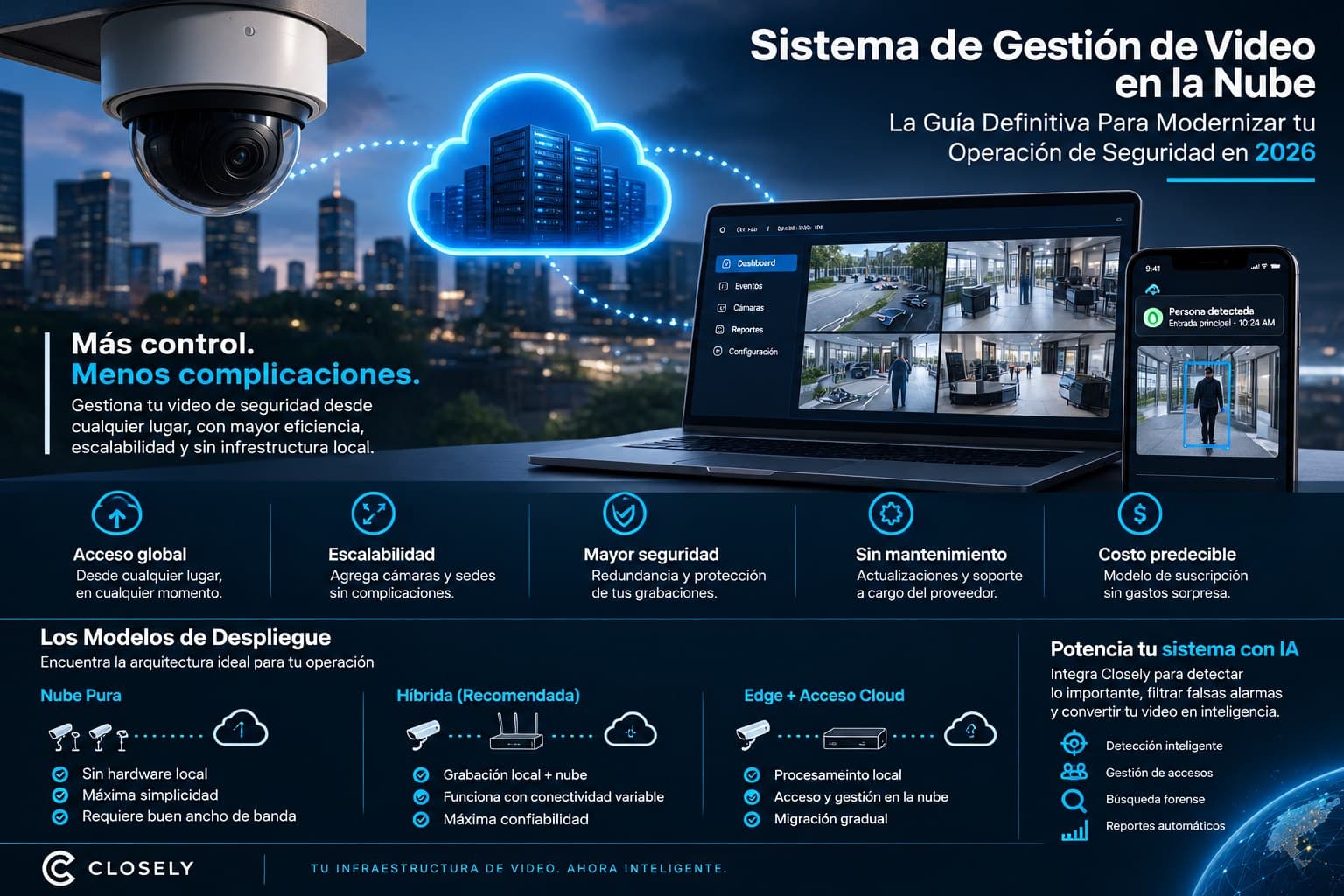
For years, managing security video meant local servers, hard drives that fail, and IT teams maintaining infrastructure. That is changing fast. This guide explains why and what it means for your operation.
Why Security Video Is Moving to the Cloud
If you have more than five security cameras, you've probably had one of these conversations: the NVR hard drive failed and two weeks of recordings were lost. Or the recording server needs replacing and costs more than budgeted. Or you want to see video from a site in another city and remote access doesn't work well.
Those problems are structural to the on-premise model, not configuration failures you fix by tweaking something. A cloud video management system attacks exactly those problems at the root: it moves storage, processing, and access to externally managed infrastructure, eliminating most maintenance headaches and replacing them with a predictable subscription model.
That doesn't mean the cloud is the right answer for everyone. There are contexts where on-premise is still the best option. But for a growing number of security operators, multi-site companies, and property managers in Latin America and the United States, the question is no longer whether to move to the cloud but when and how.
What a Cloud Video Management System Is
A cloud video management system (cloud VMS, or cloud-based VMS) is a software platform that manages security camera feeds, recording storage, and video access from cloud server infrastructure instead of local hardware.
In the traditional model, camera video flows to a local NVR or server, is stored on physical hard drives at the same site, and remote access depends on network configurations that frequently cause problems. When the hardware fails or reaches end of life, there's a replacement project and possible data loss.
In a cloud-based VMS, camera video flows directly to cloud servers or through a small edge device that sends it there. Storage lives on the vendor's infrastructure, with built-in redundancy. Access is through a web or mobile app from anywhere with internet. And updates, maintenance, and scalability are the vendor's responsibility, not the customer's.
Deployment Models: Pure Cloud, Hybrid, and Edge
Not all cloud video management systems work the same way. There are three main architectures that determine how video flows and where it's processed.
Pure Cloud
In the pure cloud model, cameras stream their video directly to the cloud over the internet. There's no local NVR or edge server. Storage, processing, and access happen entirely on the vendor's infrastructure.
This model offers maximum installation simplicity and minimal hardware maintenance. But it has a critical requirement: enough reliable internet bandwidth at each site. For a site with 20 cameras at 1080p, streaming continuously to the cloud can require between 40 and 80 Mbps of upload bandwidth. Where that connectivity doesn't exist or is expensive, pure cloud isn't practical.
Hybrid (Edge + Cloud)
The hybrid model is the most common in serious commercial installations. A small edge device, sometimes called a bridge or gateway, is installed at each site. Cameras stream to the local device, which handles recording locally for resilience against internet outages and simultaneously syncs with the cloud for remote access and backup.
This model solves the bandwidth problem and ensures recordings aren't lost if the internet connection temporarily fails. It's the recommended architecture for most commercial installations in Latin America, where connectivity can be variable.
Edge with Cloud Access
In some deployments, primary processing and storage happen on a more powerful local NVR or server, but access and management run through a cloud platform. The local NVR keeps the recordings, but the operator accesses and manages everything from a cloud-hosted web or mobile interface. It's the most gradual way to migrate from an on-premise architecture without abandoning existing infrastructure.
The Real Advantages of a Cloud-Based VMS
Access from Anywhere Without Network Headaches
Remote access is probably the most immediate benefit. With a cloud-based VMS, viewing video from any camera on your phone or computer is as simple as opening an app. No VPN configurations, no dynamic IP problems, no router ports to open.
For a security operator in Bogotá managing sites in Medellín, Cali, and Barranquilla, or for a company in Miami with locations in Houston and Los Angeles, that simplicity of access has enormous operational value. The operator sees everything from a single interface, wherever the cameras are.
Scalability Without Infrastructure Projects
Adding cameras or new sites to an on-premise system often requires expanding the NVR, adding storage capacity, reviewing the network, and possibly upgrading the server. Adding cameras to a cloud video management system is usually as simple as connecting the camera to the network and authorizing it on the platform.
For security operators who regularly onboard new clients, or companies expanding their network of locations, that difference in onboarding speed has a direct operational impact.
Redundancy and Protection Against Data Loss
When a local hard drive fails, the recordings stored on it are lost. Cloud video surveillance systems replicate recordings across multiple servers in different geographic locations, making data loss from hardware failure virtually impossible.
For installations where video evidence is critical, whether for regulatory compliance, legal proceedings, or security audits, that data integrity guarantee has value well beyond operational convenience.
Automatic Updates Without Maintenance Windows
An on-premise VMS requires planned updates, maintenance windows, and in some cases specialized technical intervention to update the software. A cloud VMS updates automatically without interrupting operations. New features arrive without upgrade projects.
Limitations You Should Know
The cloud isn't the right answer for every context. There are situations where on-premise is still preferable:
Sites with limited or expensive connectivity. If internet bandwidth at the site is insufficient or very expensive, the pure cloud model isn't viable. The hybrid model mitigates this, but requires local edge hardware.
Data sovereignty requirements. Some organizations have legal or compliance obligations requiring data to be stored in specific jurisdictions. Before implementing a cloud VMS, it's worth checking where the vendor's servers are and whether that meets the applicable regulatory requirements.
Long-term storage costs. Long-term cloud storage can be more expensive than local storage for installations with many cameras and extended video retention. The total cost of ownership analysis should include projected storage costs over several years.
Latency for real-time analysis. In applications where video processing latency matters, the pure cloud model can introduce delays that don't exist with local processing. For real-time video analysis, the hybrid model with edge processing is generally more appropriate.
Leading Cloud VMS Vendors
The cloud video management system market is growing fast and has several well-established options:
Verkada is perhaps the best-known cloud VMS in the North American market. Its model is built mainly around its own hardware: Verkada cameras stream to its cloud, with centralized management from its platform. The downside is that getting the full platform usually means migrating to its cameras.
Genetec and Milestone offer cloud versions of two of the most established on-premise VMS platforms in the enterprise market. Their advantage is familiarity for organizations already using those platforms. Their downside is the complexity and cost typical of the enterprise segment.
Eagle Eye Networks is one of the most established cloud VMS platforms aimed at the commercial market, with support for cameras from multiple manufacturers and a hybrid model that works well at sites with variable connectivity.
Avigilon Alta (part of Motorola Solutions) is Avigilon's cloud platform, with strong integration with access control and video analytics.
How Closely Adds Artificial Intelligence on Top of Your Cloud VMS
Whatever cloud VMS you use, there's a layer that makes the real difference between a system that records and one that understands: artificial intelligence that doesn't just detect, but operates. Some of these platforms include video analytics, but their focus is still recording, storing, and providing access to video.
Closely connects to cameras via RTSP, exactly like your VMS, and runs in parallel on the same infrastructure. Your cloud VMS keeps doing what it does well: storage, remote access, recording management. Closely adds what a VMS isn't designed to do: autonomous AI agents that detect anomalous behavior before it becomes an incident and run the security operation around those events.
Watcher analyzes camera feeds in real time, detecting loitering, perimeter violations, aggressive behavior, weapons, abandoned objects, tailgating, and more than thirty additional patterns, with up to an 88% reduction in false alarms compared with conventional motion detection.
Gatekeeper manages visitor flows autonomously, notifying via WhatsApp and a simultaneous phone call without anyone having to watch the video constantly.
Investigator turns forensic search in recordings from hours into queries that take minutes, using natural language.
Supervisor tracks guard patrols in real time.
Reporter documents every event automatically without the operator filling in anything.
For security operators in Colombia, Mexico, Peru, Chile, and the U.S. market who already have a cloud-based VMS or are in the process of adopting one, Closely is the intelligence layer that turns that video infrastructure into an active security operation instead of a passive recording system.
Closely offers a free two-week demo to show how the five agents work on your specific camera infrastructure, whether you're using a cloud VMS or an on-premise installation.
10 Frequently Asked Questions About Cloud Video Management Systems
1. What is a cloud video management system and how does it work?
A cloud video management system is a software platform that manages security cameras, recording storage, and video access from cloud servers instead of local hardware. Cameras stream their video over the internet to the vendor's servers, either directly or through a local edge device. The operator accesses video and manages the system from a web or mobile app from anywhere, without complex network configurations.
2. How much bandwidth do I need for a cloud VMS?
Bandwidth depends on the number of cameras, their resolution, and whether you use pure cloud or a hybrid model. As a reference, a 1080p camera streaming continuously requires roughly 2 to 4 Mbps of upload bandwidth. For 20 cameras on pure cloud, that means 40 to 80 Mbps of stable upload available at the site. The hybrid model significantly reduces that requirement because it only syncs relevant events and clips to the cloud instead of all continuous video.
3. Is it safer to store security video in the cloud than locally?
In most cases, yes. Cloud video surveillance systems from established vendors replicate data across multiple servers in different locations, making loss from hardware failure virtually impossible. Local NVR storage is exposed to disk failure, physical damage, equipment theft, and prolonged power outages. The downside is that security depends on the vendor's practices, so choosing one with certifications such as ISO 27001 or SOC 2 matters.
4. Are the cameras I already have compatible with a cloud VMS?
It depends on the cloud VMS. Some, like Verkada, are designed mainly for their own hardware. Others, like Eagle Eye Networks or the cloud offerings from Genetec and Milestone, support cameras from multiple manufacturers via RTSP and ONVIF. Before choosing a cloud-based VMS, checking the compatible camera list is the first step. If compatibility with existing hardware is a priority, open-platform VMS options are the most practical choice.
5. How long are recordings kept in a cloud VMS?
Retention periods in cloud video management systems vary by vendor and subscription plan. Common ranges are 7 days, 30 days, 90 days, and one year. Longer periods carry higher storage costs. For regulatory compliance, some sectors have specific retention requirements: financial institutions, healthcare facilities, and government contractors often need 90 days or more. Long-term cloud storage cost is a factor to include in the total cost analysis.
6. Can I use a cloud VMS in Latin America with the available connectivity?
Yes, with the right architecture. The hybrid model, where a local edge device handles primary recording and syncs events to the cloud, works well even with variable or limited connectivity. In major cities in Colombia, Mexico, Peru, Chile, and Argentina, the fiber connectivity available for commercial sites is generally sufficient for the hybrid model. For rural sites or those with cellular-only connectivity, the feasibility analysis needs more detail.
7. What's the difference between a cloud VMS and adding AI to my cameras with Closely?
A cloud VMS manages video storage and access: it records, organizes, and provides remote access to recordings. Closely is the intelligence layer that understands what that video contains: it detects anomalous behavior in real time, manages visitor access, tracks guards, and documents incidents automatically. Closely can run on the same cameras already connected to your cloud VMS, in parallel, without replacing it. They're complementary layers that solve different problems.
8. Are cloud video surveillance systems suitable for small businesses?
Yes, and often more so than on-premise for small businesses. A small business doesn't have an IT team to maintain a local NVR, update software, replace hard drives, and manage remote access. A cloud video surveillance system removes that burden: the vendor manages the infrastructure, access is simple from your phone, and the monthly subscription model is predictable compared with the periodic capital investments of the on-premise model.
9. What happens to my recordings if I cancel my cloud VMS service?
Policies vary by vendor, but in most cases cloud recordings are deleted after a period following cancellation. Before signing up for any cloud-based VMS, it's important to review its data export and post-cancellation retention policy. Responsible vendors let you export recordings before they're deleted. For critical recordings, keeping a local copy or periodically exporting the most important events is a prudent practice.
10. How does Closely integrate with an existing cloud VMS?
Closely connects to cameras directly via RTSP, in parallel with the cloud VMS you're already using. It doesn't replace or modify the existing VMS configuration. Cameras keep streaming to the cloud VMS for storage and access, and Closely simultaneously processes those same feeds for real-time AI detection. The integration requires no changes to the camera infrastructure. Closely offers a free two-week demo to verify compatibility with your specific setup before any commitment.