HEVC vs H.264: Which Video Codec Should You Use on Your Security Cameras in 2026
HEVC vs H.264 in video surveillance: how each codec affects storage, bandwidth and the accuracy of AI running on your cameras.
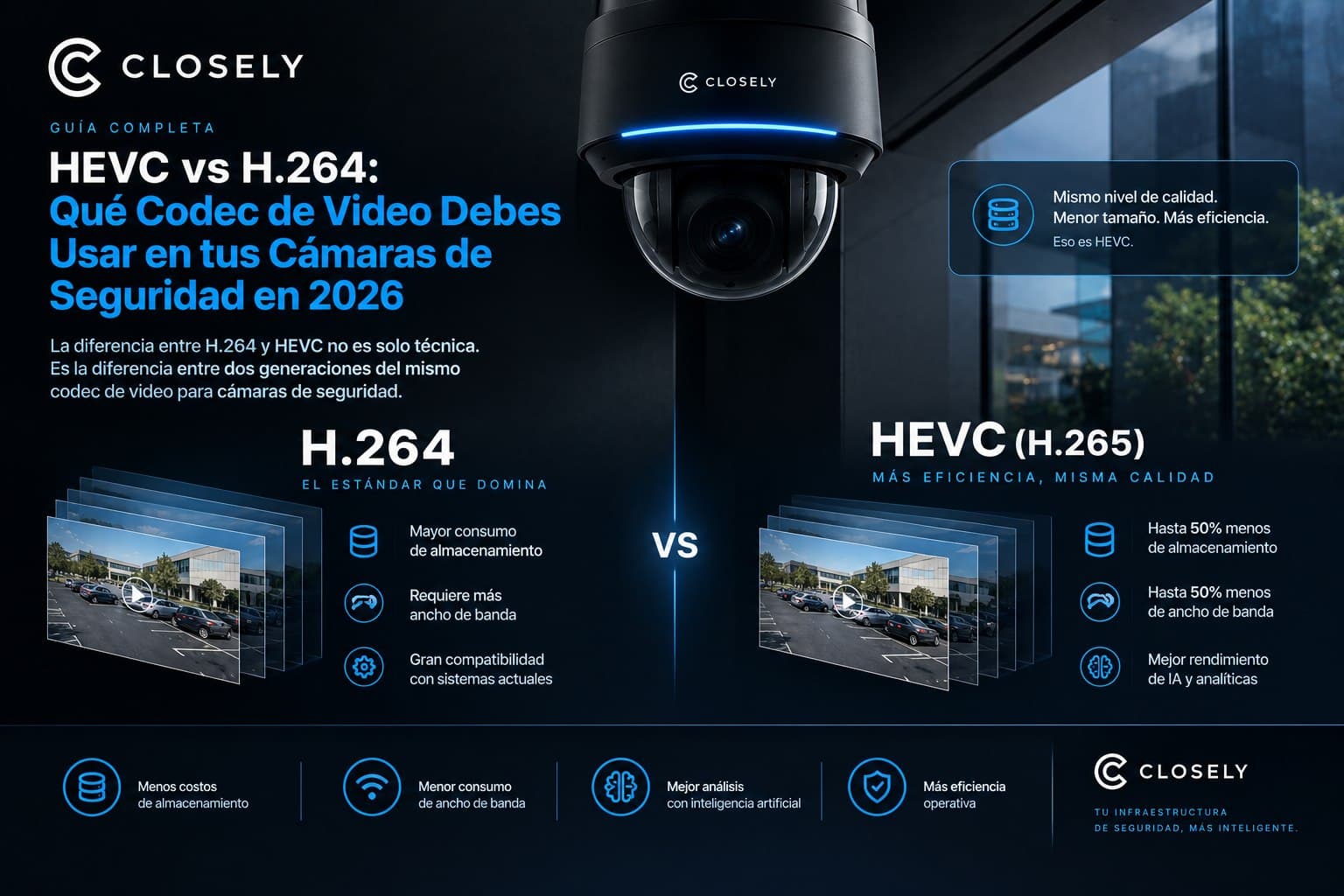
The difference between H.264 and HEVC is not just technical. It's the difference between two generations of the same security camera video codec. It affects how much storage you use, how much bandwidth you need, and how well artificial intelligence works on your cameras. Here is the complete explanation.
Why the Video Compression Codec Matters More Than It Seems
When someone sets up a security camera system, the conversation usually revolves around resolution, field of view, night lighting, and camera price. The video compression codec almost never comes up. That's a mistake, because the codec determines three things that directly impact the cost and performance of the system:
First, how much storage your camera footage consumes. Second, how much bandwidth the system needs to stream feeds in real time. Third, how much useful visual information each video frame contains, which directly affects how well an artificial intelligence system can work on that footage.
Comparing H.264 with its successor HEVC is, in essence, comparing the standard technology that has dominated video surveillance for more than a decade with its more efficient successor. Understanding the difference doesn't require being a video engineer. It requires understanding three basic concepts: compression, quality, and compatibility.
What a Video Compression Codec Is and What It Does
A video compression codec is an algorithm that reduces the size of video files without completely eliminating the visual information they contain. Without compression, a single 1080p security camera streaming at 30 fps would generate approximately 7.5 GB of data per minute. That is completely unmanageable in terms of storage and transmission. H.264 video compression was the solution that made large-scale digital video surveillance viable.
What a codec does is identify redundancy in the video: areas of the frame that don't change from one frame to the next, repetitive patterns, regions of low visual complexity, and represent that information more compactly without the human eye easily distinguishing it from the original video.
The efficiency of a security camera video codec is measured mainly by the relationship between the visual quality it preserves and the file size it generates. A more efficient codec produces smaller files at the same visual quality, or higher visual quality at the same file size.
H.264: The Standard That Still Dominates Video Surveillance
How It Works and Why It Became Universal
H.264, technically known as MPEG-4 AVC (Advanced Video Coding), has been the dominant video compression codec in the video surveillance market since around 2008. It was developed by the Joint Video Team as the successor to the MPEG-2 and H.263 codecs, and offers a substantial efficiency improvement over its predecessors.
H.264 works on the principle of inter-frame predictive coding: instead of storing each full frame as an independent image, the codec stores a complete reference frame (called an I-frame) and then only saves the differences between that frame and subsequent frames (called P-frames and B-frames). When a camera records a hallway where nothing moves for five seconds, H.264 essentially stores the first full frame and then records that the next 150 frames are nearly identical, with minimal differences.
This H.264 compression technique achieves size reductions of 50% to 80% compared with uncompressed video, depending on content. Video with a lot of motion, such as a busy building entrance, compresses less efficiently than video of a static space.
Why H.264 Is Still Relevant in 2026
Despite being the dominant standard for more than 15 years, H.264 remains the default configuration on most security cameras installed in Latin America and a significant share of those installed in the United States. The reasons are practical:
H.264's compatibility with players, browsers, recording systems, and video management software is virtually universal. Any NVR, DVR, VMS, or video player on the market can decode H.264 without compatibility issues. That removes friction in complex integrations.
The processing needed to encode and decode H.264 is relatively low, which means cameras with less powerful processors can use it without sacrificing performance. In installations with older or mid-range hardware, H.264 remains the most stable option.
Finally, most installation technicians in Latin America have experience working with H.264 and understand how to optimize bitrate, resolution, and frame rate settings for that specific codec.
HEVC (H.265): The Evolution That Cuts Storage in Half
What Makes HEVC Different
HEVC, or H.265 (High Efficiency Video Coding), is the direct successor to H.264, developed by the Joint Collaborative Team on Video Coding. Its goal was to achieve the same visual quality as H.264 at roughly half the bitrate, or equivalently, to double compression efficiency while maintaining the same quality.
To achieve this, HEVC has a fundamental difference from H.264 in the size of its processing blocks. H.264 works with blocks of up to 16x16 pixels to identify changes between frames. HEVC works with units of up to 64x64 pixels (called CTUs, Coding Tree Units), which allows it to capture redundancy patterns across larger areas of the frame and compress them more efficiently.
In addition, HEVC uses more sophisticated intra-frame prediction techniques (up to 35 prediction modes versus H.264's 9) and higher-precision transform algorithms, resulting in more efficient compression with no visible quality loss to the human eye.
The Biggest Advantage: Storage
The most immediate impact of HEVC vs H.264 in a security camera installation is storage. A camera configured with HEVC at the same visual quality as one configured with H.264 generates roughly half the data per unit of time.
For an installation with 20 cameras running continuously for 30 days, that can be the difference between needing 30TB of storage with H.264 and 15TB with HEVC. In storage hardware cost, that's significant. And in installations with dozens or hundreds of cameras, the savings scale proportionally.
In Latin America, where the cost of physical storage and internet bandwidth is more variable than in the United States and security installation budgets tend to be tighter, HEVC's efficiency has a direct practical impact on the economic viability of larger installations.
The Biggest Disadvantage: Computational Load
H.265 HEVC's greater efficiency comes at a cost: it requires significantly more processing power to encode and decode than H.264. The more complex algorithms that allow it to achieve higher compression are also more demanding on the processor.
In practice, using HEVC on security cameras means not every camera can handle it smoothly. Low-end cameras with basic image processors may show frame rate drops, higher latency, or instability when trying to stream HEVC at high resolutions. And on the NVR or recording server side, decoding multiple simultaneous HEVC streams requires more CPU than the equivalent H.264 streams.
For installations where the hardware is modern and was selected with HEVC in mind, this is not a problem. For installations with hardware more than five years old that wasn't designed for HEVC, it can be a limiting factor.
Head-to-Head: H.264 vs HEVC in Video Surveillance
| H.264 | HEVC (H.265) | |
|---|---|---|
| Compression efficiency | Good | Very high (up to 2x more efficient) |
| Storage required | Baseline | Up to 50% less |
| Bandwidth required | Baseline | Up to 50% less |
| Computational load | Low to moderate | Moderate to high |
| Compatibility | Universal | High on modern hardware |
| Visual quality at equal bitrate | Good | Superior |
| Hardware temperature | Lower | Higher (more processing) |
| Recommended installations | Mixed or older hardware | Modern hardware, new installations |
| Storage cost | Higher | Up to 50% lower |
How the Codec Affects the Quality of AI on Your Cameras
This is the point least discussed in HEVC vs H.264 comparisons, but it is increasingly relevant as more security installations add artificial intelligence on top of their cameras.
Computer vision models that analyze camera feeds to detect people, vehicles, anomalous behavior, and other security events work on video frames exactly as they arrive at the processing system. And the quality of those frames depends directly on the codec and bitrate used to compress them.
Video compressed with H.264 or HEVC at a very low bitrate can show compression artifacts, jagged edges, loss of detail in fast-motion areas, and reduced overall sharpness. Those artifacts degrade the quality of the AI system's detections: a poorly defined edge can cause a detection model to misclassify an object, or miss an event it should have detected.
The general recommendation for installations planning to add AI to their cameras is this: prioritize adequate bitrate over maximum compression efficiency. Concretely, it's better to run HEVC at a moderate bitrate that achieves good visual quality than to run HEVC at a very low bitrate to maximize storage savings at the expense of the image quality the AI system needs.
For 1080p cameras in AI-enabled video surveillance installations, a reference bitrate of 2 to 4 Mbps with H.264, or 1 to 2 Mbps with HEVC, is recommended to maintain enough quality for reliable detections.
How Closely Works with H.264 and HEVC Cameras
Closely connects to camera feeds using both H.264 and HEVC through standard protocols such as RTSP and ONVIF. The platform ingests the camera's compressed stream, decodes it, and processes it with its five artificial intelligence agents: Watcher for computer vision detection, Gatekeeper for access control, Investigator for forensic search, Supervisor for guard coordination, and Reporter for automatic documentation.
What does affect Closely's performance is the quality of the video the camera delivers, not the codec used. A camera using HEVC at an adequate bitrate delivers high-quality frames that Watcher's computer vision models can analyze with greater precision. A camera using H.264 at a sufficient bitrate also delivers frames of adequate quality. The problem arises when bitrate is reduced too far, in either codec, to maximize storage savings, because that degrades the image to the point where AI detection loses reliability.
For installations evaluating which codec to configure before implementing Closely, the team's recommendation is to use HEVC when the hardware supports it properly, keeping a bitrate that preserves the visual quality needed for reliable detection. For installations with older hardware that doesn't handle HEVC stably, H.264 at an adequate bitrate is perfectly valid.
Closely's team can review the codec and bitrate configuration of your specific installation during the free two-week demo, to make sure video quality is optimal for AI agent performance.
10 Frequently Asked Questions About HEVC vs H.264 on Security Cameras
1. What is the main difference between H.264 and HEVC (H.265)?
The main difference is compression efficiency. HEVC offers roughly twice the efficiency of H.264: at the same visual quality, HEVC generates files approximately 50% smaller, or equivalently, at the same file size it produces better visual quality. This is achieved with more complex encoding algorithms that require more processing power, which is HEVC's main disadvantage on older or low-end hardware.
2. How much storage do you save by switching from H.264 to HEVC in a security camera installation?
Typical savings are between 40% and 50% of storage space at equivalent visual quality. For an installation with 20 cameras consuming 30TB per month with H.264, switching to HEVC under the same resolution and frame rate conditions can reduce that consumption to approximately 15TB per month. Actual savings vary with video content: scenes with lots of motion compress less efficiently than static scenes.
3. Is H.264 or HEVC better for security cameras in a residential building?
It depends on the available hardware. If the cameras and NVR are modern and support HEVC stably, HEVC is the better option to save storage without sacrificing quality. If the hardware is more than five years old or budget-grade, H.264 may be more stable and reliable. For residential buildings in Latin America where hardware budgets are tight, the most pragmatic approach is to verify that the NVR properly supports HEVC before configuring it on every camera.
4. Do Hikvision and Dahua cameras support HEVC?
Yes. Modern Hikvision and Dahua camera lines, especially mid- and high-end models manufactured after 2018, support H.265 HEVC. The codec is usually configured from the camera's admin panel or from the NVR. However, the cheapest or oldest models from both brands may not support HEVC, or may only support it at lower resolutions or frame rates.
5. Does the compression codec affect the quality of AI on the cameras?
Indirectly, yes. The codec itself doesn't affect AI quality, but the bitrate at which compression is configured does. A bitrate that's too low, with any codec, generates compression artifacts that degrade the image and reduce the accuracy of computer vision models. Both H.264 and HEVC work well for AI systems if the bitrate is configured correctly. HEVC has the advantage of achieving good visual quality at a lower bitrate, potentially enabling better detections with lower storage consumption.
6. When should I NOT use HEVC on my security cameras?
You shouldn't use HEVC when the hardware doesn't support it properly: if cameras show frame rate drops or instability when encoding HEVC, or if the NVR or recording server lacks the CPU capacity to decode multiple HEVC streams simultaneously. It's also not advisable to use HEVC if your video management software doesn't fully support it, since some older VMS systems have compatibility issues with H.265. In those cases, H.264 is the more stable and predictable option.
7. What bitrate should I set for H.264 and HEVC on 1080p cameras with AI?
For 1080p cameras in installations with artificial intelligence, a reasonable reference bitrate is 2 to 4 Mbps with H.264 and 1 to 2 Mbps with HEVC, both in variable bitrate (VBR) mode, which automatically adjusts the rate to the motion in the scene. Setting bitrates below these ranges can reduce image quality to a level that negatively affects the AI system's detections. If storage is limited, it's better to reduce frame rate before reducing bitrate below those thresholds.
8. What is the difference between H.265 and HEVC? Are they the same?
Yes, they are the same standard with two different names. H.265 is the name assigned by the ITU-T (International Telecommunication Union), while HEVC (High Efficiency Video Coding) is the name assigned by ISO/IEC. Both names refer to exactly the same codec, published in 2013 as the successor to H.264/AVC. In the video surveillance industry, both terms are used interchangeably.
9. Does Closely work equally well with cameras using H.264 and cameras using HEVC?
Yes. Closely ingests camera streams using standard protocols (RTSP and ONVIF) and can process both H.264 and HEVC with no difference in agent functionality. What affects AI model performance is the video's visual quality, which depends on the configured bitrate, not on the codec itself. Closely can review and recommend the optimal codec and bitrate configuration during the free two-week demo to ensure the best possible agent performance on each installation's specific infrastructure.
10. Is there a better video codec than H.265 for video surveillance in 2026?
There are more modern options than HEVC, mainly AV1 and VVC (H.266), which offer greater compression efficiency. However, neither has the level of adoption or hardware compatibility that H.265 HEVC has in today's video surveillance market. AV1 is growing in internet streaming applications, but its support in security cameras and NVRs is still very limited. For security installations in Latin America and the United States in 2026, HEVC vs H.264 remains the relevant comparison, and HEVC is the recommendation for new installations with modern hardware.