Reolink Security Cameras: Complete Guide and How to Add Artificial Intelligence in 2026
Reolink cameras: what they offer, their limitations, when they make sense, and how to add artificial intelligence without replacing hardware.
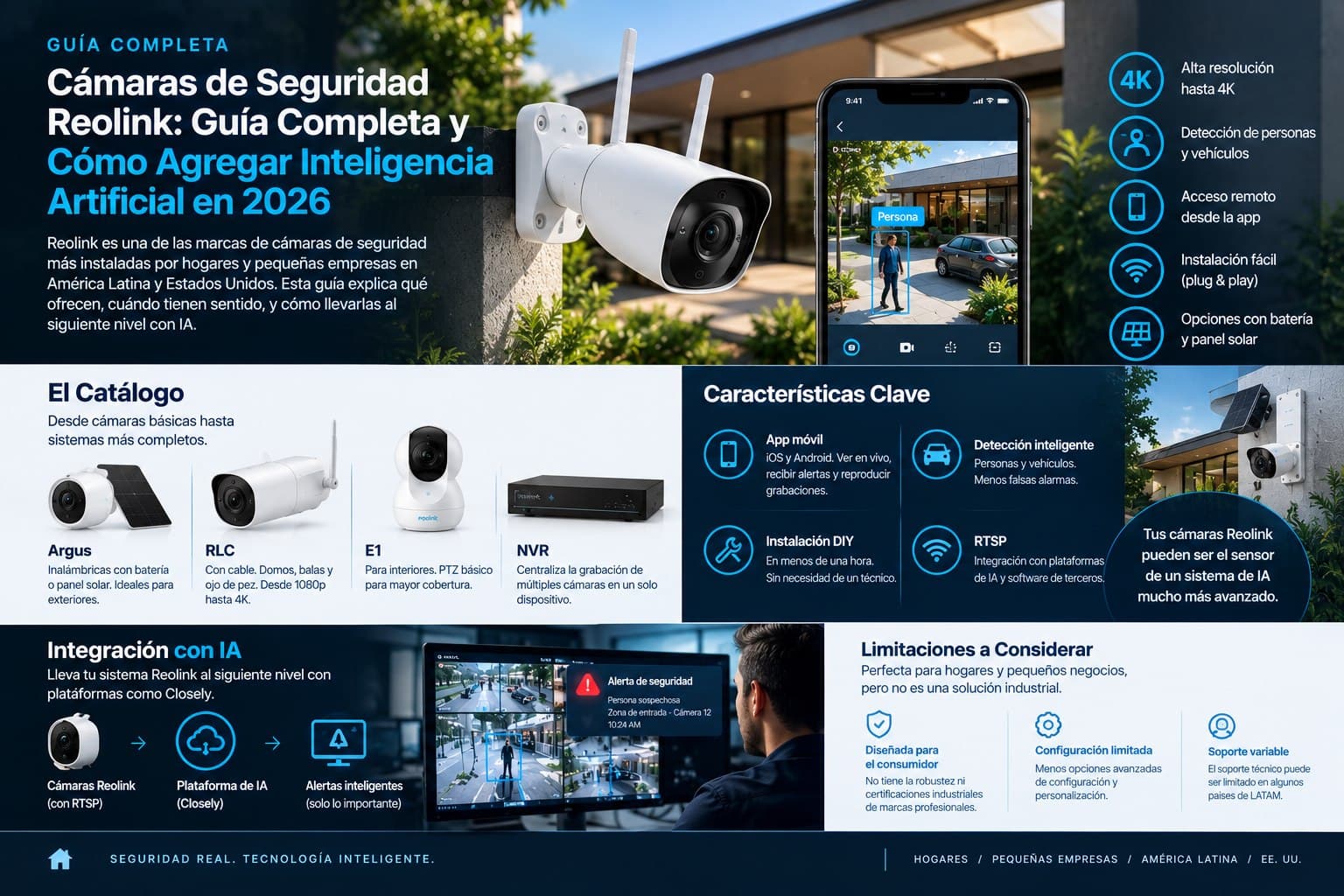
Reolink is one of the most widely installed security camera brands among homes and small businesses in Latin America and the United States. This guide explains what they offer, when they make sense, and how to take them to the next level with AI.
Why Reolink Became One of the Most Popular Brands in Home Security
Few brands in the security camera market have grown as fast in the consumer segment as Reolink. In a market historically dominated by Hikvision and Dahua at the professional end, and by unsupported generic brands at the budget end, Reolink found a space nobody was serving well: reasonable-quality cameras, hassle-free installation, a functional mobile app, and an accessible price.
The result is that today Reolink security systems are found in millions of homes and small businesses worldwide, including a considerable presence in Colombia, Mexico, Chile, Peru, and the Spanish-speaking market in the United States. These are cameras people buy online, install without calling a technician, and start using within hours.
But as with any security system, the question that really matters isn't just whether the camera records. It's whether what the camera captures becomes useful information when it's needed most.
What Reolink Cameras Offer: What They Do Well
The Catalog: From Basic Cameras to More Complete Systems
Reolink has a broad catalog ranging from entry-level standalone cameras to complete kits with an NVR. Its best-known lines include:
Reolink Argus is its line of wireless cameras with battery or solar panel. They're especially popular where cabling isn't practical: porches, gardens, garages, house facades. The solar panel version is particularly attractive because it eliminates the need to recharge batteries manually.
Reolink RLC is its line of wired cameras, the most common in home and small business installations. It includes dome, bullet, and fisheye models, with resolutions from 1080p up to 4K on its most recent models. These cameras connect to Reolink NVRs or work standalone with SD card storage.
Reolink E1 is its line of indoor cameras, designed for monitoring inside the home or business. It includes basic PTZ models that can rotate to cover more area from a single mounting point.
Reolink NVRs are its network video recorders, which centralize recording from multiple Reolink cameras on a single device with local hard drive storage.
The Features That Make Reolink Attractive to the Mass Market
What separates Reolink from cheaper brands isn't just image quality but the user experience. Its mobile app, available for iOS and Android, is genuinely functional: it lets you view the live feed from anywhere, receive motion notifications, play back recordings, and set up detection zones without technical knowledge.
Within a Reolink camera system, its modern models include basic person and vehicle detection that reduces the volume of irrelevant notifications compared with pure motion detection. When the system detects moving leaves or a small animal, ideally it doesn't generate an alert. When it detects a person or a car, it does.
DIY installation is another key factor. Reolink security cameras are designed so that someone with no technical experience can install them in under an hour by following the manual. That significantly lowers the barrier to entry for homes and small businesses that want basic security without hiring an installer.
RTSP: The Gateway to Integration
One technical detail that sets Reolink apart from purely consumer brands is support for RTSP (Real-Time Streaming Protocol) on most of its wired models. RTSP is the industry-standard protocol that lets third-party platforms connect to the camera's video feed.
That compatibility is what makes it possible for Reolink camera systems to integrate with more sophisticated software platforms, including artificial intelligence platforms like Closely. As long as the Reolink camera has IP connectivity and RTSP support, it can become the sensor of a detection system far more advanced than what Reolink offers natively.
Reolink Limitations You Should Know
To be honest, Reolink security systems have limitations that matter depending on the use case.
They're Designed for Consumers, Not Professionals
Reolink cameras don't have the level of ruggedness, industrial certifications, or advanced configuration options that brands like Hikvision, Dahua, or Axis offer. For homes and small businesses that isn't a problem. For more demanding commercial installations, multi-site systems, or projects with complex integration requirements, the limitations of the Reolink ecosystem can be an obstacle.
Native Detection Has Its Limits
The person and vehicle detection Reolink includes in its modern cameras works reasonably well under ideal conditions. But it can't distinguish behaviors, doesn't learn the specific environment where it's installed, doesn't detect tailgating, doesn't identify abandoned objects, doesn't recognize aggressive behavior, and can't correlate events across multiple cameras.
For a home that wants to know whether someone entered the garden, Reolink's native detection is enough. For a business that wants to know whether someone is behaving suspiciously in the store before a theft happens, Reolink's native detection falls short.
A Closed Ecosystem on Some Models
Reolink's battery cameras, especially the Argus line, have connectivity restrictions that limit their compatibility with third-party platforms. Because they transmit wirelessly and in many cases don't support continuous RTSP, integrating them with external AI systems is more complex than with wired cameras.
How Closely AI Integrates with Reolink Cameras
Closely connects to Reolink cameras that support RTSP through the industry-standard protocol, exactly as it connects to cameras from Hikvision, Dahua, Axis, Hanwha, and other brands.
The process is technically simple: Closely receives the Reolink camera's RTSP stream, processes it with its three-layer detection pipeline, and generates validated alerts when it identifies genuinely anomalous events. Wired RLC cameras and E1 indoor models are the most compatible with this integration.
What Closely adds on top of Reolink security cameras is the intelligence layer the cameras can't provide on their own:
Watcher analyzes the video feed in real time looking for anomalous behavior, not just presence. The difference is crucial: a Reolink camera can alert you that someone is in your store. Watcher can alert you that this person has spent four minutes near the checkout area without buying anything, showing scanning behavior.
False alarm reduction of up to 88%. Reolink motion notifications have a significant false positive rate: leaves, shadows, lighting changes. Closely's three-layer pipeline filters those events before generating any alert, cutting noise by up to 88% compared with conventional detection systems.
Gatekeeper can manage visitor access on the cameras covering the entrances of the business or building, notifying the responsible person via WhatsApp and a simultaneous phone call without the owner having to watch the app constantly.
Investigator turns forensic search in Reolink camera recordings from hours of manual review into queries that take minutes, by attributes or description.
Reporter automatically generates incident reports without anyone having to fill in anything manually.
For small business owners in Colombia, Mexico, Peru, Chile, or the U.S. market who already have Reolink cameras installed and want to add artificial intelligence on top of that infrastructure, Closely is the most practical way to do it without replacing hardware that already works.
Closely offers a free two-week demo to see how the five agents work on the specific Reolink cameras at your site before any commitment.
When It Makes Sense to Stick with Reolink and When to Consider Other Options
Reolink Is a Good Choice If...
- You have a home or small business with basic security needs.
- Your budget is tight and you'd rather invest in camera coverage than advanced analytics.
- You want DIY installation without depending on a technician.
- You need indoor or outdoor cameras in reasonable lighting conditions.
Consider Other Brands If...
- You have a larger installation with multiple zones that need constant coverage.
- You need integration with more sophisticated access control or alarm systems.
- You'll add AI from the start and want hardware with more configuration options.
- You have industrial certification or ruggedness requirements.
Where a Reolink camera system is already installed and working, the most practical decision is usually to add artificial intelligence on top rather than replace the hardware. That's exactly what Closely does.
10 Frequently Asked Questions About Reolink Cameras and Security Systems
1. Are Reolink cameras good for business security?
Reolink security cameras are a good option for small businesses with tight budgets and basic security needs: entrance coverage, local or cloud storage, and motion notifications on your phone. For businesses that need behavior detection, real-time theft prevention, or integration with more complex access control systems, Reolink cameras on their own have limitations. In those cases, adding an artificial intelligence platform like Closely on top of existing Reolink cameras significantly expands their capabilities without replacing hardware.
2. Do Reolink cameras support RTSP for third-party software integration?
Yes. Most wired Reolink cameras, especially the RLC line, and many E1 indoor models support RTSP. This lets you connect them to video management platforms and to artificial intelligence systems like Closely that process the feed in real time. Reolink's wireless battery cameras, such as some in the Argus line, vary more in their RTSP support. If third-party integration is a priority, it's a good idea to check RTSP support for the specific model before buying.
3. How much storage do Reolink cameras need?
Storage depends on the configured resolution, frame rate, and whether you use continuous recording or motion-only recording. A 4MP Reolink camera recording in motion detection mode typically uses between 5 and 15 GB per week depending on activity in the area. In continuous mode, consumption can be between 30 and 60 GB per week per camera at full resolution. Reolink NVRs support hard drives of several terabytes, and standalone cameras can record to microSD cards of up to 256GB depending on the model.
4. How does person and vehicle detection work on Reolink cameras?
The most recent Reolink security camera models include basic person and vehicle detection that filters out some false alarms compared with pure motion detection. The system identifies whether the moving object has the shape of a person or vehicle and only sends a notification in those cases. This detection works well in adequate lighting and when objects are clearly within the field of view. It doesn't detect specific behaviors, doesn't learn the environment, and can't tell an expected visitor from a suspicious person. Those capabilities require an external AI platform.
5. Can I use the Reolink cameras I already have with Closely AI?
Yes, as long as your Reolink cameras support RTSP. Closely connects to the camera's RTSP stream and processes the video in real time with its five artificial intelligence agents. No hardware or existing recording configuration needs to change. Closely runs in parallel on the same feed that's already being recorded by your NVR or stored on the SD card. The Closely team confirms compatibility with your specific camera model during the initial assessment, before the free two-week demo.
6. Do Reolink cameras work well outdoors in Latin America?
Most outdoor Reolink cameras are rated IP66 or IP67, meaning they're dust- and water-resistant. In the climate conditions of Colombia, Mexico, Peru, and other Latin American countries, with heavy rain and temperature swings, that rating is enough for home and small business installations. For more demanding environments such as construction sites, industrial zones, or areas with extreme heat or humidity, higher-end brands with industrial certifications are more appropriate.
7. What is the difference between Reolink cameras with an NVR and those that record to an SD card?
Cameras that record to an SD card are standalone: each camera stores its own video locally. It's the simplest option for installations with one or a few cameras, but managing multiple independent cameras can be impractical. A Reolink security system with an NVR centralizes recording from every camera on a single device, makes management from the app easier, and allows larger hard drive storage. For installations with more than three cameras, an NVR generally offers a significantly better experience.
8. What Reolink camera resolution is enough to identify people in a business?
To identify people in enough detail at distances of up to 5 meters, 1080p is generally sufficient. For distances of 5 to 10 meters, or when you need to capture details like license plates or facial features more clearly, 4MP or 4K is preferable. Reolink 4MP and 4K security cameras are available at accessible prices and are the recommendation for businesses where detailed identification matters. Higher resolution means more storage and bandwidth consumption.
9. Can Closely reduce false alarms from Reolink notifications?
Yes, and it's one of the most immediate use cases. Reolink motion and person detection notifications have a false positive rate that can be frustrating: lighting changes, shadows, small animals, moving leaves. Closely applies a three-layer pipeline that first filters irrelevant motion, then classifies whether there's a relevant object in the frame, and finally reasons about whether the behavior is genuinely anomalous. The result is up to an 88% reduction in irrelevant alert volume, leaving only the events that really need attention.
10. Is it worth adding artificial intelligence to Reolink cameras, or is it better to buy cameras with built-in AI?
For most home and small business installations that already have Reolink cameras, adding AI through a platform like Closely is more cost-effective than replacing the hardware. Built-in AI on other manufacturers' cameras usually offers a fixed subset of detections without customization by industry or environment. Closely adds five configurable agents (Watcher, Gatekeeper, Investigator, Supervisor, and Reporter) that cover the full security operations cycle, with up to an 88% reduction in false alarms and a free two-week demo on your own cameras before you decide.